Graphics and animation tools |
||||
|
| Rating |
Download |
Size |
From |
Updated |
| 5/5 | Win95/98 | 13 MB | Macromedia | 98-07-18 |
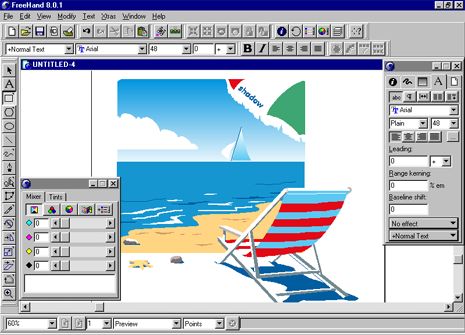
Freehand 8.01 - one of the most favourite graphic editors among professional designers along with Adobe Photohop 5. Whether your illustrations are destined for screen or print, FreeHand 8 provides good performance, an interface that responds to your needs, and plenty of cool effects to keep it fun. Its innovations are reason enough for Illustrator and CorelDraw devotees to consider switching to FreeHand as their only cross-platform drawing program
Configurable button bars let you put your most frequently used
commands in a single bar that can be docked at the top of your screen or on a floating
palette while the rest stay hidden in the menus.
FreeHand offers other innovations as well. Check out the new Reshape Freeform drawing tool. This handy item lets you modify lines in a more direct way than with the traditional B�zier handles. In the Push mode, the tool becomes a disk that nudges curves this way and that. You can vary the size of the disk on the fly using the arrow keys -- perfect for noodling with shapes and lines, getting them just so, or roughing them up. The tool's Pull mode lets you grab a length of curve and pull it around the page. Even artists already fluent in B�zier will find these intuitive tools useful for drawing organic shapes and keeping vector graphics from being so darn smooth all the time. FreeHand 8's fast redraw mode offers a speedy preview by greeking text and reducing the number of steps in blends.
Well, the big hoo-ha about FreeHand 8 is the new transparent-lens fill. Transparently filled objects behave like pieces of translucent glass over the rest of your artwork; in the Inspector panel you control the degree of opacity. Macromedia has worked around the limits of PostScript to make transparency printable: it creates a new "paste-inside" object at print time to represent overlapping areas, yet transparent objects remain editable until print time. The end result: PostScript that prints. However, since pasting inside duplicates the overlapping information, lens fills can yield wickedly complex documents. Other lens fills (which also appeared first in CorelDraw) allow an object to tint, invert, lighten, darken, or magnify all the underlying objects (even bitmaps). The magnify fill is handy for drawing realistic glass objects. The Snapshot button, which freezes a lens's content even if you move or alter the artwork beneath it, is great for doing infographics with visual call-outs. Because lens fills are nondestructive and editable, they are a ton of fun to experiment with. I think that subtle layers and wacky overlays will really open up new design possibilities.
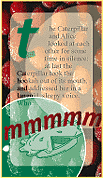
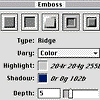
FreeHand has some great new Xtras (plug-in filters and operations that add special effects). The Graphic Hose -- which will be familiar to anyone who has used the Image Hose in MetaCreations Painter -- "sprays" a random or regular series of objects, yielding effects not unlike those of Illustrator's Ink Pen. The Shadow Xtra is great for creating soft-edged drop shadows. The Emboss tool offers a number of 3D styles that simulate relief objects such as beveled or chiseled buttons and engraved text. (I occasionally encountered low-memory warnings when using those effects, so be prepared to allocate more than the minimum RAM.) Double-clicking on any nontext object instantly brings up transform handles that let you scale, rotate, and move objects without once visiting the toolbar.
The power of editable text, as well as the ability to align, distribute, and group objects, makes FreeHand a great environment for Web design. The Web-safe 216-color palette can be imported into the color list, complete with hexadecimal names. Rasterizing can be done right within FreeHand, or you can drag and drop (or cut and paste) objects into Photoshop to convert them.
CD-ROM drive 30MB disk space Shareware/demo |
|
Paint Shop Pro 5.01 | Freehand 8.01 | Xara 3D 3 | Photoimpact |